

We Can Love Record Types Again!

Hear ye! Hear ye! Record types are powerful

tools!
For years it's been incredibly annoying that list view inline editing (and inline editing on reports) has a major limitation:
If record types are enabled for an object
And you are working on a list view (the object's tab, perhaps filtered)
You can inline edit (or even bulk edit records)
Only if the list view you've selected is filtered to a single record type.
Users love inline editing because it's so efficient. But this platform limitation could suck all the joy out of record types for us admins.
I understand why this limitation exists. The system has to enforce field-level editing restrictions based on the page layout that corresponds to each record type for the user. Otherwise list view become a way for users to get around field editing restrictions, which we definitely don't want. But this is pretty hard to explain to non-technical users. And it was one more (fairly major) thing to keep in mind as you designed any solution. Either you had to build a lot of list views so users could do what they needed, or you might have to design for not using record types so you could facilitate inline editing.
But this source of frustration is fixed in Winter '27! Run, don't walk, to Setup>User Interface and check the box next to "Make inline edits in list views with multiple record types".

Et voila! You can love record types again..
I tested, as well, and can confirm that this works as you would hope it would. If you have a list view showing records of multiple record types and you add a field, say, that is on the page layout for one record type but not for the other, you'll get the pencil on the field for the one but it will be locked for the other.
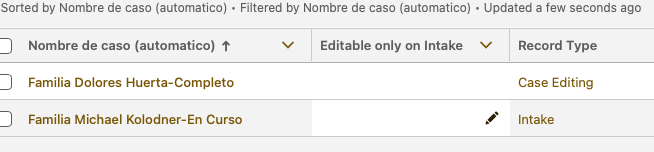
And if you try to bulk inline edit that field and select to apply the edit to multiple rows, the system will correctly only apply the change to editable rows.

Are Record Types Eventually Going Away?
Over the last several years, as Salesforce has developed dynamic forms, I've often wondered if record types were going to disappear. They've been around for ages, but they were essentially important for only two things:
Page Layouts
Picklist values
With dynamic forms, the first of those features was immediately less important. Using dynamic forms you can control page layout not just based on one field (record type) but based on many fields all at once, and even the values within those fields.
And I'll be curious to hear if others disagree, but my experience has been that assigment of different picklist values by record type is used relatively infrequently. You can already replicate that feature by using dependent picklists, in fact with more power and flexibility than just with record types.
So I'm sure people use record types a lot less than they did before Lightning and dynamic forms came out.
Obscure to Users
The reality is that users rarely understand the difference between a "record type" and just any other Type field. It's a lot easier to just say "type" when we might mean "record type." There's not much confusion if I just say "a household account" or "an account of type 'household.'" Of course, in the back of my mind I know that what I'm really saying is "an account record whose record type is 'Household Account.'" And that's critically important in the sense that selection of the record type happens before the rest of the fields, so it's not quite so easy to switch as other fields labeled Type. But this is the kind of minutiae that we admins try to keep users from having to think about.
Record Types Can Add Hassle
Let's also acknowledge that record types can add some confusion. I'm most often tripped up when I create a new picklist value. You have to not ignore the checkboxes to assign it to the right record type(s).

If you don't do it on creation you have to open up each record type, scroll to the field in question, and then assign it there. That's way more hassle.

And this is a massive source of confusion when the new picklist value, clearly activated in the object manager, does not show up on record pages for users.
But using record types come with other overhead as well, including assigning them to the right profiles, setting a default record type, etc. And don't even get me started on what happens if a hidden profile is assigned a record type as its default... (Thank you Tim Schug for making it easier to deal with this.)
Some people have even argued that you should never use record types for Contact. I'm not 100% sold on that argument—I think it's often useful to have a "child" record type so you can require info about their parent/guardian—but I'm 90%+ in agreement.
But Record Types Add Power and Retain Simplicity
Say what you will, though, I also think record types are incredibly useful. And relying on them can actually reduce technical debt or org complexity, which is valuable in so many ways.
As I've said many times during presentations (but perhaps not written about): Despite the power they offer, I do not use dynamic forms. Why?
Moving fields around in the Lightning App Builder is just so slow.
With the ability to make any particular field conditionally displayed, it's nearly impossible to keep track of whether a user may or may not see a particular field. In other words, knowing "is this field on the page layout?" becomes challenging to determine.
The Classic page layout editor still controls which fields are inline-editable for users on list views and reports. (In Winter '27 you can now override this as well, but I'll write next time about why I recommend you do not do that.)
Lastly, for me, as a consultant, it would be confusing to work sometimes in dynamic forms and sometimes in the Classic page layout editor. Not a problem if you're in a single org. But I switch among so many orgs that I want to keep things simple.
So, of course, given that I'm not using dynamic forms, the ability to control page layout by record type is incredibly important. And it's so much simpler using record types and page layouts. If I have an object with a dozen different record types (And it happens, sometimes for very good reasons.), it's far easier to maintain 12 page layouts in the object manager than to try to either have 12 different flexipages or a single page with tons of conditionality.
One of the best tricks in Salesforce is using one record type for new records, then changing to a different record type via a before save flow that runs on create.

This allows you to have a page layout for new records. Then when the user saves, they're instantly on another record type with totally different set of fields. (You could do the same with dynamic forms, but the Lightning Record Page would be quite complicated to look at in the Lightning App Builder. With record types and a before save flow it's very simple to maintain.)
So raise a glass for the humble record type. Thanks to a seemingly small update in Winter '27 it's an even better tool than it was just a few weeks ago.

