

Salesforce is Breaking Salesforce


Salesforce is about to make their own flagship product (the Salesforce platform) practically unusable. No joke. The added security of the Step-Up Authorization to view reports and dashboards is going to be enforced on or about July 1 (it’s actually staggered over 30 days). Though it’s not enforced in Sandboxes until June 17, you can test how it’s going to work already if you’ve got a sandbox on Summer ‘26.
Bottom line: It’s bad. It's gonna break reports and dashboards. And I've written before that reports and dashboards are kinda Salesforce's superpower, a main selling point for the platform over other CRM or online database options.
To the best of my knowledge, this post is accurate as of 7:15pm Eastern on June 2nd. It's possible that by the time it's published or by the time you read it that a patch will have changed some of the behaviors I'm writing about. 🤷🏻A few minutes ago Salesforce announced a delay of the enforcement schedule. They've also said that a patch is coming "this week" to sandboxes to fix some things. But we have no idea what things nor how they’ll be fixed. In the spirit of Safe Harbor statements, I can only write about what exists, not what might or might not be better when a patch rolls out. Frankly, given how poorly the initial release works, I don’t have a lot of confidence that their rushed patch is going to get it right.
What is coming?
“Enforced,” in the parlance of a Salesforce security setting, means that something that right now is an option you can enable or disable is going to be enabled and no longer possible to disable. On a date that’s unclear for any particular org, but is set to be no later than July 31, Salesforce is going to enforce step-up authentication for viewing any report or dashboard.

This means two things:
First, the “ping.” The user will have to complete a multi factor authentication action. If you’ve been using MFA for a while, this is the same as you’re used to: a notification from the Salesforce Authenticator app that you have to tap to approve.
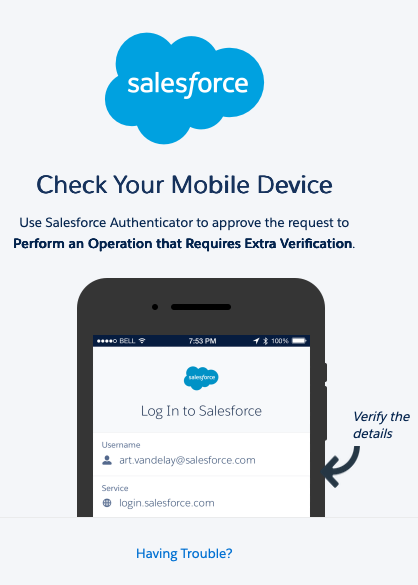
Then "the window." Step-up authentication will last for a maximum time window for what counts as a single authenticated step up “session.” When the session expires, users will have to get another ping before viewing reports or dashboards. The default setting for this window will be two hours (120 minutes) and while it can be set shorter, that is the maximum.

On its face, these are both reasonable security measures. (The second one, in fact, I’m fine with. I might wish the window could be longer, but I won’t quibble…) The problem is that the ping is not being implemented in ways that I would consider reasonable or even, frankly, workable.
Additional clarifications: First, people originally understood this to be a step-up requirement for exporting reports or taking other such unusual activities. But that is incorrect; this applies to any interaction with reports or dashboards, including viewing even a single embedded report chart.
The rollout timing is confusing, especially now that it's been pushed. The original schedule sounded like it lined up with the rollout of Summer '26. But since Salesforce only ever said a date and "on a rolling basis," rather than saying "with installation of the Summer release," it seems like that difference probably means something.
The Ping is the Thing
It’s dependent on their method of login, but the vast majority of users complete an MFA challenge during the moment of login. Here’s where it gets stupid: That original login MFA ping does not start a “session” that counts toward viewing reports and dashboards.
Think about that for a second: I have just logged in. I click to view my daily metrics dashboard. It’s been maybe two seconds (or less) since I completed the MFA challenge. But now I’m getting another MFA ping for the “step-up.” I probably haven’t even gotten my phone back into my pocket! At best, it’s going to feel annoying to have to do two pings just a few seconds apart. But I submit that the vast majority of users are going to contact their admins to say something along the lines of “something is wrong with the Salesforce Authenticator app—it keeps forgetting that I’ve just logged in.” Sure, we can tell them that this is expected behavior. But it’s dumb expected behavior.
If that were the extent of the problem, I would not be writing this blog post. I’m making a big deal because it gets a whole lot worse. The step-up ping is not triggered by any of the kinds of actions (or inactions) you might assume. If you have a dashboard embedded on your home page, for example, the viewing of that page does not trigger the ping. Instead, the dashboard component on that home page shows a rather scary error message.

It's small in the screenshot, but it says:
This page has an error. You might just need to refresh it. [Unhandled PromiseRejection (check your browser console to find the code that isn't handling the error 'Uncaught (in promise)': {"message":"An internal server error has occurred\n\Error ID: 1017770241-73650 (598350221)"}]Super helpful, right?
Reloading the page or clicking on the component does not trigger the ping or make the dashboard load. The only way to trigger the ping is to click on the Dashboards or Reports tab. Even clicking on a direct link to a dashboard or report doesn’t do the trick.

You have to click on either the Reports or Dashboards tab to get the ping. But clicking on those tabs is going away from where you want to be. After going to those tabs, you can go back to the Home page and it will load as expected. It seems like an extreme understatement to say that is an unintuitive click path.
Consider the situation of an executive user. Perhaps this is the executive director of your nonprofit. Or perhaps it’s the CEO of a multi-billion-dollar company. The helpful admin knows that this leader is only going to use Salesforce to get big picture information. (If we can get them to ever log into Salesforce at all…) So she has created an app (really just a single Home tab) tailored specifically for them: it’s got a single dashboard embedded in it. Today, when the exec logs in, they enter username and password, tap Allow on the MFA challenge on their phone, and within seconds see the dashboard that tells them all they want to know about the financial situation of the organization. Awesome! Maybe they don’t love the MFA challenge, but they live with it because they understand that it’s there to keep their company’s data safe.
But by July 31 the executive app simply will not work at all. They’ll log in only to be greeted by this screen.
None of the likely actions they might take (reload, log out and back in, etc…) will fix it. And nobody, to my knowledge, has any kind viable workaround.
I can articulate a click path that will allow that executive to view their dashboard:
Log in > Complete MFA > Click on Dashboard tab > Complete MFA again > Click on Home tab or on name of dashboard.
That’s not a reasonable series of clicks. And the executive is never going to follow it. They’re just going to conclude that "Salesforce is broken" or it's useless (or both) and never bother to log in again.
[Pissing off an executive, I would argue, is not so much my problem, nor even yours, dear reader. It is a problem for Salesforce as a company. For years we’ve talked about dashboards and an executive-focused app as a great strategy for building an executive champion. The step-up authorization, as currently built, is going to torpedo that tool.
Update 6/10/2026
Salesforce has officially confirmed that this should not be the behavior and that embedded reports and dashboards on a Lightning page will not trigger a step-up ping. A patch is rolling out to sandboxes and the behavior when it goes live in production orgs should not be as bad as it was when I tested this. Hopefully other improvements will also be coming. But considering the short timeline and the pressures on the programmers, I couldn't speculate on the schedule of those changes.
Ask for a temporary reprieve!
Apparently at least one consultant (who will remain nameless for now) asked Salesforce Support how to keep his integration from breaking and was told that his client could request an extension of the deadline. I think we should all ask for this! All you have to do is open a case with support requesting a delay of the enforcement of step-up authorization to view reports and dashboards. You probably need to include a business justification. I suggest, "Because if you implement it as currently designed my organization will stop being able to use Salesforce on the day of enforcement."
You can stop reading now 🛑
If you are only interested in the high-level overview, you can be done with this blog post. I’ve made my point about how terrible this is going to be and hopefully you’ll hear from me later that Salesforce has fixed things. Sorry I don’t even have a workaround to offer you.
But if you want to understand more of the details, keep reading.
Why SSO is DOA for MFA
As I understand it, one of the most confusing and challenging things about the step-up security requirement is that single sign-on (SSO) actually makes for a worse, not better, experience.
Presumably your SSO provider counts as MFA—and even phishing resistant MFA—so you’re in compliance with the security requirements there. But since that MFA is not one that was triggered by Salesforce it can’t be used to set the flag that starts a step-up security session. This is a double whammy. First of all, it means that users who have just logged in via SSO are going to get the second ping even if Salesforce were to fix the situation for direct logins through username, password, and Salesforce Authenticator. But I think this also means that users who log in via SSO and have not, to this point, had to even set up Authenticator, will now have to add that for viewing reports or get a ping via email. I’m sure users are going to love that.
This Feels Like Lazy Programming
I don’t want to be too harsh on Salesforce’s employees here, but it really feels like this is being implemented without any thought to user experience, too quickly, and with no testing.
For direct logins where it is Salesforce’s own platform triggering the MFA, the initial MFA challenge should count for the first two hour session. [Clearly!] How is an MFA ping seconds later more secure than the first one was? Perhaps someone from Salesforce can articulate a technical reason here. Given the other ways recent security changes have been rushed and poorly communicated, I just can’t give the benefit of the doubt in this case.
I will give credit that the SSO case is harder. To the extent I understand it, I get that the technical triggering of the MFA through SSO is outside Salesforce’s control and, therefore, perhaps, they’re not willing to consider that step-up. But if it can count as phishing resistant and good enough security for an admin to log in, it seems very strange that wouldn’t be good enough to view dashboards.
What I really think is lazy programming is the situation I described above, where an executive user simply won’t be able to use Salesforce at all. Either Salesforce didn’t figure this out in testing or they think it’s acceptable user experience. [Spoiler: It’s not acceptable UX.] How could they have done literally any functional testing and not run up against this limitation? I noticed it in less than a minute. It took me about four more minutes to confirm the situation, create screenshots, and post about it to ask if I was understanding it properly.
Is Login As dead?
As of when I’m writing this on June 2, the ability of admins to Login As a particular user is also broken by the step-up verification. If you login as someone else and then take an action that triggers step up authentication, the ping goes to the user you are logging in as. This makes Login As essentially useless as a tool for admins troubleshooting anything report or dashboard related, since you would have to be doing it in real time with the user. We’ve heard Login As listed as an item for fix in the coming patch, but no details on that. So as of the current moment, admins are going to be essentially unable to troubleshoot report viewing issues.
Shared Logins and Things like GConnector/XL Connector Are Toast
As far as we can tell, any kind of shared login to run reports is non-viable at this point. If you rely on apps like GConnector to export data from a Salesforce report to a spreadsheet so external partners or non-Salesforce users can see it, this isn’t going to be able to refresh on a schedule. The user that the GConnector logs in as might be able to manually refresh after step-up, but this isn’t clear right now.
I’m passing no judgement on this front. Maybe this kind of process has been too much of a security hole for years. But the fact is that lots of organizations use reports to facilitate different kinds of processes or integrations and it looks like those are going to break.
Help us!!! 🛟
It’s really too bad TDX passed before this was announced and Dreamforce doesn't happen for several months. If there was a True to the Core session I would be first in line to ask a question about this. (The room would erupt in supportive applause.) But if these changes go into effect on the current schedule, then TTTC at Dreamforce will be far too late. Extreme damage will have been done. This blog post is my cry for help.
I’ll be happy to volunteer to be part of the solution. Presumably that means doing testing and giving user feedback within a very compressed time frame. I’m sure there are a lot more of us that will also raise our hands, both MVPs and many more members of the community.
To be clear: this is not our job. Nor is it the job of anyone that doesn’t get paid by Salesforce. We are willing to do this because we want to make things better for our users. Salesforce ought to be paying their employees to do this right the first time.

