

Functions Inside Functions

Recently a client needed to take the options selected in a multiselect picklist and output them as a list for use in an Awesome Table that's on their website. The Awesome Table takes a list of members and their interests makes it sort- and filterable.

So in our implementation of Salesforce we needed to have a multiselect picklist to capture those member interests. And then we needed a way to output that picklist for use in updating the Awesome Table every so often.
Sounds simple.
At first.
Ah, multiselect picklists. You have to both love and hate them.

Such a mess for reporting. But so required for many a real life situation. Sometimes we have no option but to slog our way through.
First Problem
The first challenge with multiselect picklists is that the order of values is not fixed. If you select a value at the bottom of the list, then one from the top, they'll stay in the order you added them. They won't be in the order of the picklist value options.


Same Picklist. Different Order of Selected Options.
The vast majority of the time, that's fine. But when you're trying to look at a report it becomes a lot harder to tell when people have a value in common.
And that out-of-order possibility, as you might guess, was going to wreak havoc when used to sort and filter on an Awesome Table. So I had to come up with a way to ensure that my values were displayed in the same order regardless of the order they were added.
Formula One
It's actually not that hard to translate a multiselect picklist into text that will ensure the order. You just write a formula that concatenates a series of IFs that either show a bit of text if a particular value is present (is "included") or nothing if it's not:
IF( INCLUDES( yourfield__c , "Option 1"), "Option 1; ", "")
&
IF( INCLUDES( yourfield__c , "Option 2"), "Option 2; ", "")
&
IF( INCLUDES( yourfield__c , "Option 2"), "Option 3; ", "")
If all three options are selected, the output is:
Option 1; Option 2; Option 3; Fine in many applications. But that semicolon and space at the end (red, bold, and underlined for emphasis) is annoying.
Plus Awesome Table needed things to be comma separated, not semicolons. Obviously I could easily swap in commas instead of semicolons in that formula. But there would still be problemmatic characters at the end.
Making It Worse
Thank you to the amazing community! I asked if a formula was even going to be able to do this and naturally SteveMo was quick to reply, with credit to Deepak Anand for teaching him this trick.
To get rid of that trailing seperator we are going to first make things worse, then wrap the whole thing in a SUBSTITUTE function to fix it.
In step 1 of the rewrite we actually add more characters to the end of our formula output:
+ 'MORE STUFF'Our full formula is now:
IF( INCLUDES( yourfield__c , "Option 1"), "Option 1, ", "")
&
IF( INCLUDES( yourfield__c , "Option 2"), "Option 2, ", "")
&
IF( INCLUDES( yourfield__c , "Option 2"), "Option 3, ", "")
+ 'MORE STUFF'
If all three options are selected, the output will be:
Option 1, Option 2, Option 3, MORE STUFFIf just one:
Option 1, MORE STUFFEtcetera...
So far we're actually getting farther from our desired state. (But since I replaced semicolons with commas, at least we have no more semicolons.)
Then Better
Now we wrap the whole enchilada in a SUBSTITUTE function (the bold first and last lines):
SUBSTITUTE(
IF( INCLUDES( yourfield__c , "Option 1"), "Option 1, ", "")
&
IF( INCLUDES( yourfield__c , "Option 2"), "Option 2, ", "")
&
IF( INCLUDES( yourfield__c , "Option 2"), "Option 3, ", "")
+ 'MORE STUFF'
, ', MORE STUFF', NULL)
This means, "If you find ', MORE STUFF', swap in nothing."
So we end up with:
Option 1, Option 2, Option 3Et voilá!
The "MORE STUFF" is just a marker for what you're going to get rid of. It's always going to be there at the end. And preceding it will always be your separator, regardless of which value was the last used. So the SUBSTITUTE function lops off the appropriate last bit.
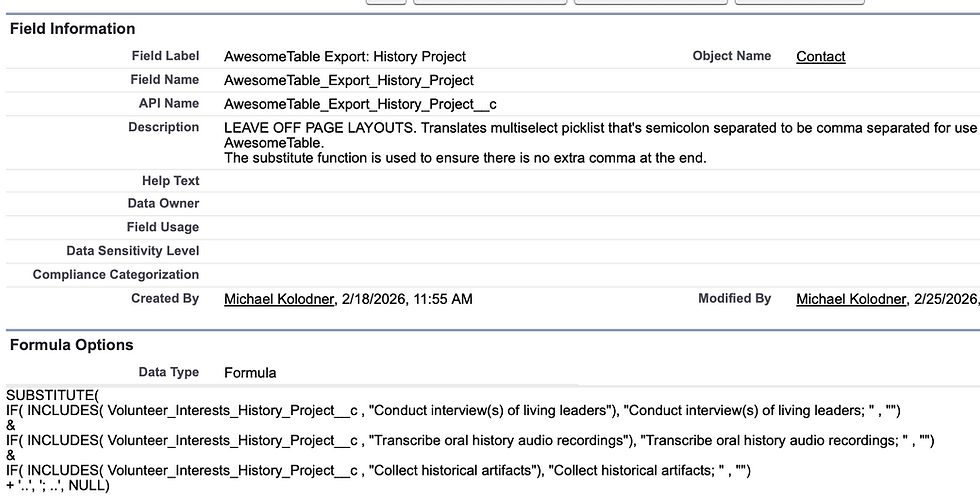
Here's how it looks in real life:

Doubling Down to Hurt My Brain
There are actually five different multiselect picklists for volunteer interests in this client org, divided into categories. So we have one of these SUBSTITUTE formulas for each category. Here's one, for example:
And then we have one that puts them together, shows category names and then their values inside parentheses, and does the substitution again!

So the formula output with all values in all five picklists selected looks like this:

My head hurts just thinking about how I made this in the first place.

